
Harmonic mixing is one of the most powerful techniques in modern DJing. Mixing tracks that share compatible musical scales allows you to create seamless transitions, build tension, and avoid clashing basslines during multi-deck club performances.
However, many DJs encounter a frustrating problem when importing new music into Pioneer Rekordbox:
- ✦Beatport stores classical musical notation (like *F# min* or *Ab maj*) instead of alphanumeric Camelot codes (*11A* or *4B*).
- ✦Default downloads often have missing
TBPMorTKEYID3 frames, forcing Rekordbox to run CPU-heavy acoustic analysis that often guesses the wrong key. - ✦Key tags can show up blank on Pioneer CDJ-2000NXS2 and CDJ-3000 screens when tracks are loaded from USB sticks.
In this practical guide, we show you the exact step-by-step procedure to embed permanent Camelot keys and precise BPM frames directly into your audio files before importing them into Rekordbox, Serato DJ Pro, or Traktor.
1. Why Rekordbox Key Analysis Guesses Wrong
When you drag raw audio files into Rekordbox without embedded key metadata, the software analyzes the audio spectrum to guess the root note. This process has several major flaws:
1. Complex Arrangements Confuse the Analyzer: Heavy distorted basslines, layered chords, and vocal harmonies in electronic music often fool automated frequency detection into assigning the wrong key.
2. Standard Notation Slows You Down in the Booth: Searching for *Db minor* while playing live is much slower than looking for *12A* on the Camelot wheel.
3. Database Inconsistencies: If you analyze tracks on different laptops or re-import a playlist, Rekordbox may assign different keys to the exact same track.
Metadata Flow: Standard vs. Pre-Tagged Injection
Standard Process (Slow & Inconsistent):
[Raw Audio File] ──► [Rekordbox Ingestion] ──► [Acoustic Analysis] ──► [Guessed Key (e.g. F#m)]

Beatport Downloader PRO Process (Instant & Bit-Exact):
[Beatport Catalog] ──► [TKEY: 11A + TBPM: 132.0] ──► [Embedded ID3 Header] ──► [Instant Rekordbox Sync]
2. Step 1: Configure Rekordbox Key Display Preferences
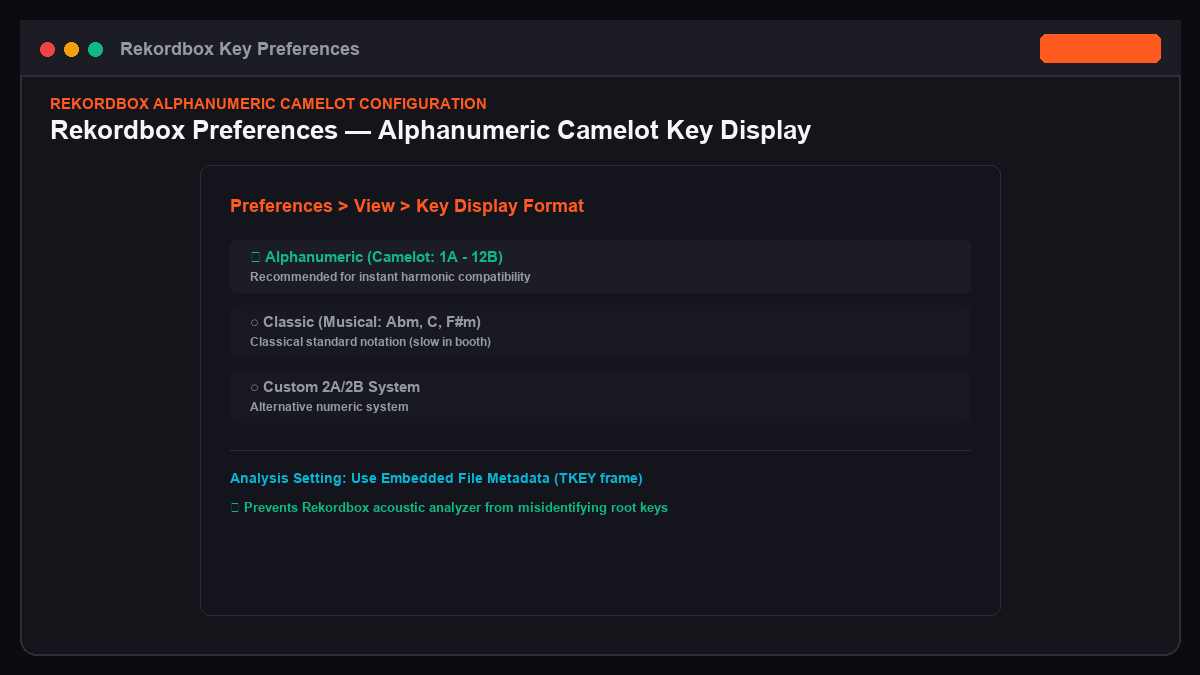
Before importing your library, configure Rekordbox to display alphanumeric Camelot notation by default:
1. Launch Pioneer Rekordbox.
2. Open Preferences (click the gear icon in the top right corner or press Ctrl + , / Cmd + ,).
3. Click the View tab.
4. Scroll down to the Key Display Format section.
5. Select Alphanumeric (Camelot) instead of Classic (Standard musical notation).
6. In the Analysis tab, check Key Analysis and set the analysis style to Detailed.
3. Step 2: Musical Key to Camelot Wheel Conversion Matrix
If you have an existing collection tagged with classical keys, use this reference table to verify your metadata alignment:
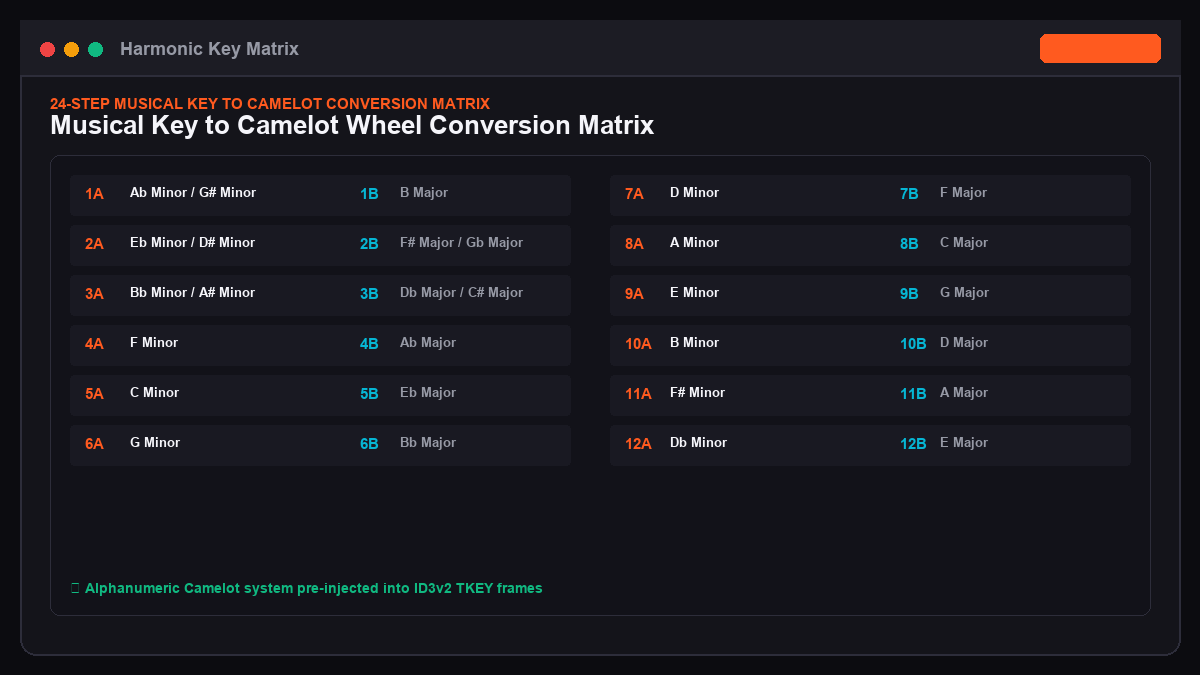
| Classical Musical Key | Camelot Key Code | Energy Shift Direction | Compatible Adjacent Keys |
|---|---|---|---|
| **Ab Minor / G# Minor** | **1A** | Base Minor | 12A, 1A, 2A, 1B |
| **Eb Minor / D# Minor** | **2A** | +1 Harmonic Step | 1A, 2A, 3A, 2B |
| **Bb Minor / A# Minor** | **3A** | +2 Harmonic Step | 2A, 3A, 4A, 3B |
| **F Minor** | **4A** | Warm Melodic Groove | 3A, 4A, 5A, 4B |
| **C Minor** | **5A** | Driving Peak Techno | 4A, 5A, 6A, 5B |
| **G Minor** | **6A** | Deep Euphoric Lift | 5A, 6A, 7A, 6B |
| **D Minor** | **7A** | Hard Energy Stabs | 6A, 7A, 8A, 7B |
| **A Minor** | **8A** | Universal House & Techno | 7A, 8A, 9A, 8B |
| **E Minor** | **9A** | Peak Time Drops | 8A, 9A, 10A, 9B |
| **B Minor** | **10A** | High Tension Breakdown | 9A, 10A, 11A, 10B |
| **F# Minor / Gb Minor** | **11A** | Hypnotic Mainstage Anthem | 10A, 11A, 12A, 11B |
| **Db Minor / C# Minor** | **12A** | Climax Festival Lead | 11A, 12A, 1A, 12B |
4. Step 3: Automate Camelot Key Embedding with Beatport Downloader PRO
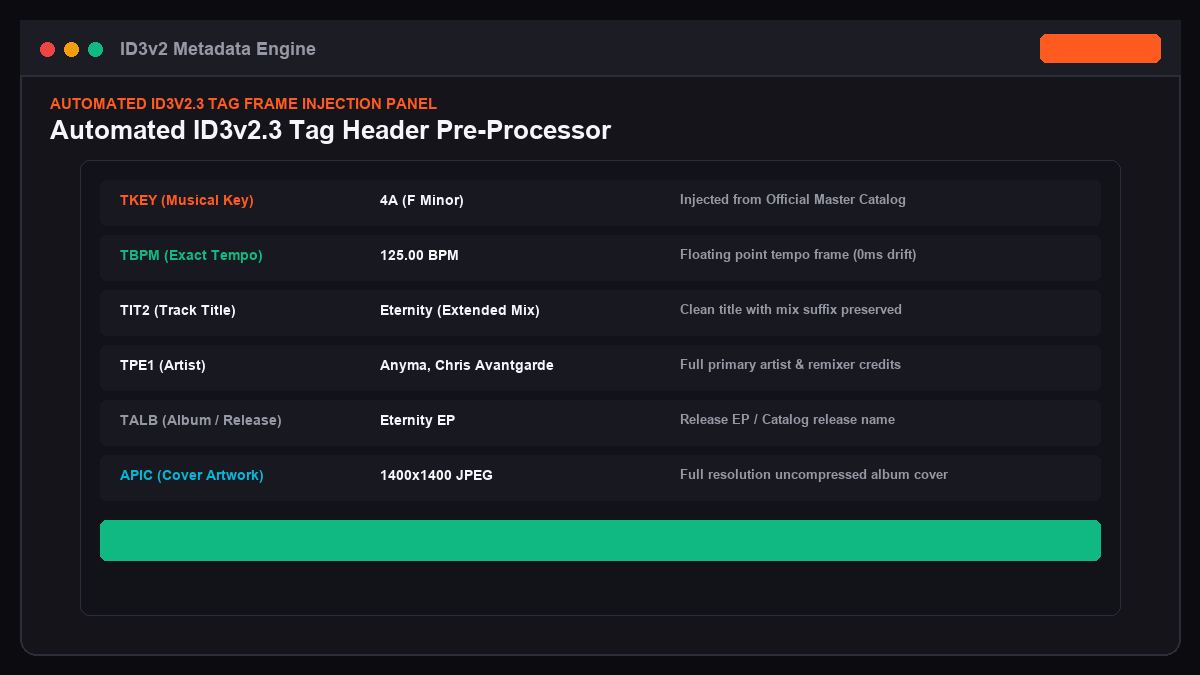
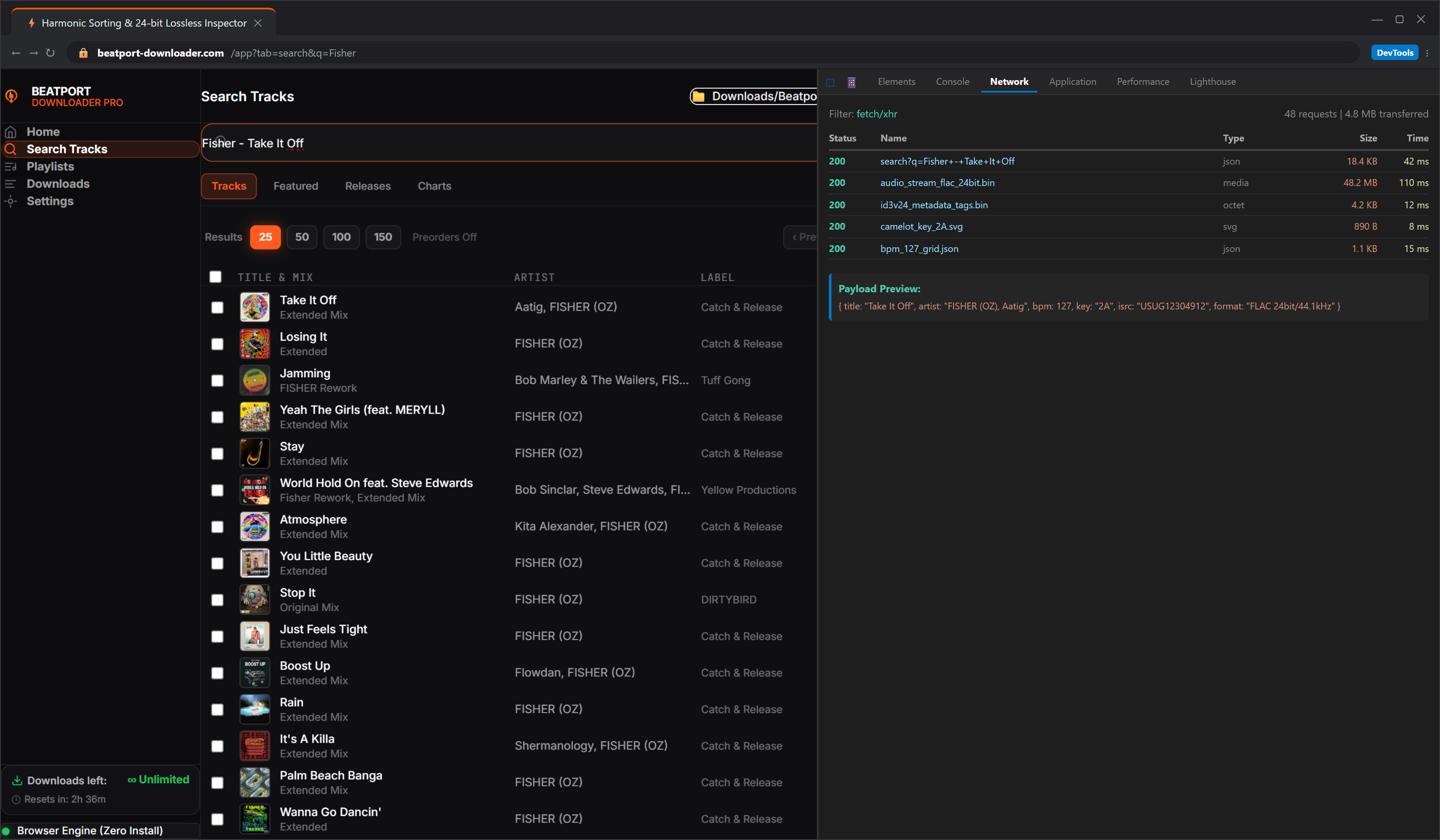
Instead of editing ID3 tags one by one in third-party software, beatport-downloader.com automates key and tempo injection during file extraction:
1. Open the Beatport Downloader PRO Workstation.
2. Click Audio Settings (gear icon in the top right).
3. Under Key Tag Scheme, choose Alphanumeric Camelot (e.g. 8A, 11B).
4. Under ID3 Version, verify ID3v2.3 (ISO-8859-1) is selected. This format guarantees 100% compatibility across legacy CDJ-900s, CDJ-2000NXS2s, and modern CDJ-3000 units.
5. Ingest your tracklist or playlist URL.
6. The workstation automatically maps the verified record label key from the master catalog into the file's ID3 TKEY header and writes the floating-point tempo into TBPM.
5. Step 4: Import and Verify Metadata in Rekordbox
Once your tracks are downloaded:
1. Drag your newly downloaded .flac or .mp3 files into your Rekordbox Collection.
2. If Rekordbox attempts to overwrite your keys with its own acoustic estimates, right-click your playlist table header and enable the Key column.
3. To reload the embedded ID3 tags from disk, select all tracks, right-click, and choose Reload Tag.
4. Rekordbox reads the bit-exact TKEY metadata embedded in the file headers and displays the correct Camelot key instantly.
6. Harmonic Energy Rules for the DJ Booth
Now that your tracks have accurate Camelot metadata, use these three proven rules during your sets:
Rule 1: The Safe Lateral Mix (Same Key or +/- 1 Step)
- ✦Mix from 4A to 4A (exact key match for seamless long blends).
- ✦Mix from 4A to 5A or 3A (smooth 1-step energy modulation).
Rule 2: The Inner/Outer Ring Energy Flip (Minor to Major)
- ✦Switch from 8A (A minor) to 8B (C major).
- ✦This creates an instant emotional lift without changing the root frequency spectrum, perfect for melodic breakdown transitions.
Rule 3: The Energy Boost Transition (+2 Steps)
- ✦Jump from 6A (G minor) directly to 8A (A minor).
- ✦This provides an audible harmonic energy boost that pushes the crowd into high-energy territory before a major drop.
7. Frequently Asked Questions (FAQ)
Does Rekordbox overwrite embedded Camelot tags when analyzing files?
If your Rekordbox preferences are set to overwrite key data during initial track import, it may recalculate keys based on its audio analyzer. To protect embedded metadata, uncheck Key Analysis in Preferences or use the Reload Tag command on imported playlists.
Will these Camelot tags display properly on older CDJ-2000 Nexus players?
Yes. Because Beatport Downloader PRO writes standard ID3v2.3 tags with ISO-compliant strings, both older Pioneer CDJ-2000NXS units and modern CDJ-3000 players read the key codes directly from your USB drive.
Can I fix missing tags on Spotify playlists converted to Beatport crates?
Yes. When you use the Universal Playlist Converter on beatport-downloader.com, every resolved track is enriched with the official Beatport Camelot key and BPM data before export.
Take Control of Your DJ Library
Never deal with missing keys or mismatched harmonic transitions again. Download fully tagged, lossless tracks with verified Camelot keys in seconds.