
Building a professional DJ library track by track can drain hours of your preparation time. If you find a 50-track curated chart or have a packed cart on Beatport, clicking individual download links, waiting for single file streams, and manually renaming audio files is tedious.
In this practical, hands-on tutorial, we walk through the exact procedure for batch downloading complete Beatport playlists, top genre charts, and user crates directly into studio master 24-bit FLAC audio using beatport-downloader.com.
We also show you how the built-in metadata processor injects standard Camelot musical keys, precise BPM values, and 1400x1400 high-resolution album artwork into every downloaded file before packing them into a clean, store-mode ZIP archive.
1. Prerequisites and Audio Setup
Before you start batch downloading, make sure your audio environment meets these criteria:
1. A Modern Chromium or Webkit Browser: Google Chrome, Brave, Microsoft Edge, Safari, or Firefox with Web Streams API support.
2. Sufficient Local Storage: Lossless 24-bit / 44.1 kHz FLAC tracks average 40 MB to 70 MB per file. A 50-track playlist requires roughly 2.5 GB to 3.5 GB of free disk space.
3. Beatport Downloader Account or Pro Key: While the free tier grants 5 free FLAC tracks every 24 hours, an active Pro lifetime license unlocks unlimited multi-threaded batch extractions and zero wait queues.
Batch Download Pipeline Architecture:
┌─────────────────────────────────────────────────────────┐
│ Input: Beatport Playlist / Chart / Cart URL             │
└────────────────────────────┬────────────────────────────┘
                             │ 1. Catalog Ingestion
                             ▼
┌─────────────────────────────────────────────────────────┐
│ Beatport Downloader PRO Cloud Engine                    │
│ ├── Concurrent Metadata Scraper (ISRC, BPM, Camelot Key)│
│ ├── 24-bit / 44.1 kHz FLAC Audio Stream Ingestion       │
│ └── 1400x1400 HD APIC Artwork Embedder                  │
└────────────────────────────┬────────────────────────────┘
                             │ 2. Streaming Delivery
                             ▼
┌─────────────────────────────────────────────────────────┐
│ Client-Side Output: Store-Mode ZIP Archive / Direct File│
│ └── Drag and Drop directly into Rekordbox, Serato & USB │
└─────────────────────────────────────────────────────────┘
2. Step 1: Locate and Copy Your Target Beatport URL
The batch engine supports multiple types of Beatport URLs:
- ✦Top 100 Genre Charts:
https://www.beatport.com/genre/melodic-house-techno/90/top-100 - ✦Curated DJ Charts:
https://www.beatport.com/chart/summer-peak-time-weapons/812390 - ✦Release and Album Pages:
https://www.beatport.com/release/eternity-extended/4198231 - ✦Artist Discographies:
https://www.beatport.com/artist/anyma/918231/tracks - ✦External Streaming Playlists: Spotify, Apple Music, and Deezer playlist URLs via the universal playlist converter modal.
Open your browser, navigate to Beatport, and copy the full URL from your address bar.
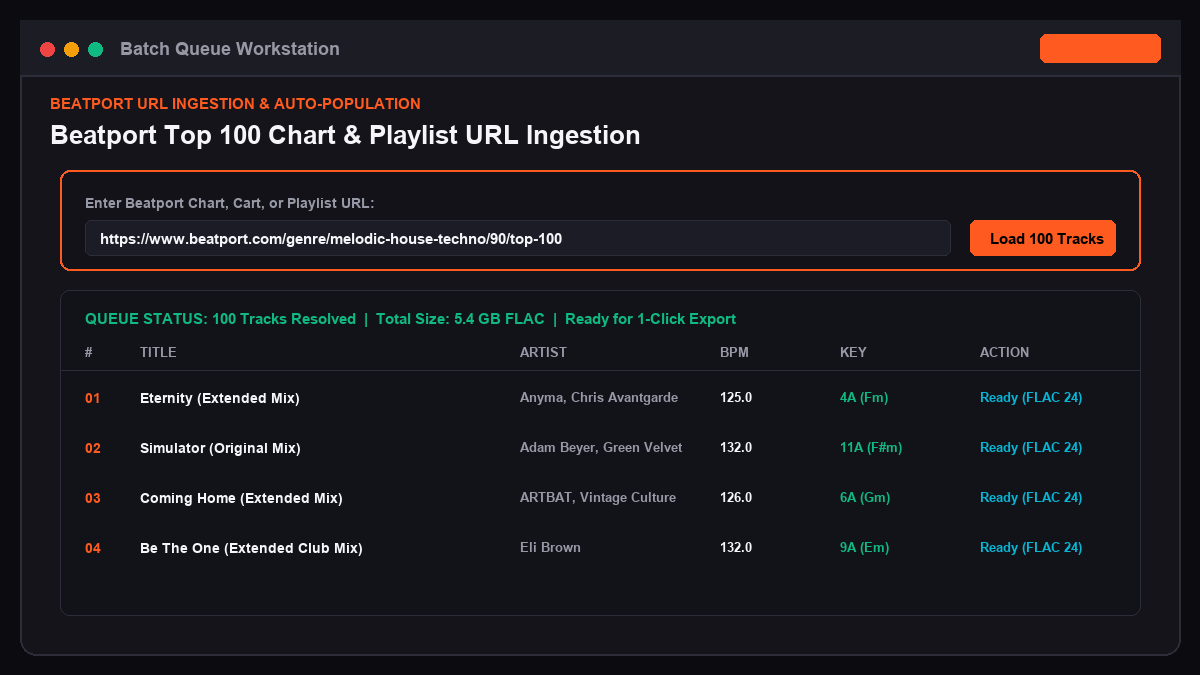
3. Step 2: Ingest the Tracklist into Your Batch Queue
Now open the downloader application and load your tracks:
1. Open beatport-downloader.com/app in your browser.
2. In the top search bar, paste your copied Beatport URL.
3. Press Enter or click Search / Load URL.
4. The system queries the Beatport catalog and populates the workstation with the full tracklist in seconds.
You will see the complete track table displaying:
- ✦Track artwork preview
- ✦Track title and mix name (Original Mix, Extended Mix, Dub Mix)
- ✦Primary artists and remixers
- ✦Record label and catalog code
- ✦Original BPM tempo
- ✦Analyzed musical key displayed in standard Camelot notation (for example, 4A for F minor or 8B for C major)
Example Batch Tracklist Table:
┌────┬──────────────────────────┬──────────────────┬───────┬──────┬─────────┐
│ #  │ Title                    │ Artist           │ BPM   │ Key  │ Format  │
├────┼──────────────────────────┼──────────────────┼───────┼──────┼─────────┤
│ 01 │ Eternity (Extended Mix)  │ Anyma, Chris Av. │ 125.0 │ 4A   │ FLAC 24 │
│ 02 │ Simulator (Original Mix) │ Adam Beyer, G.V. │ 132.0 │ 11A  │ FLAC 24 │
│ 03 │ Coming Home (Ext. Mix)   │ ARTBAT           │ 126.0 │ 6A   │ FLAC 24 │
│ 04 │ Be The One (Ext. Mix)    │ Eli Brown        │ 132.0 │ 9A   │ FLAC 24 │
│ 05 │ Roll The Dice (Orig Mix) │ Bart Skils       │ 131.0 │ 1A   │ FLAC 24 │
└────┴──────────────────────────┴──────────────────┴───────┴──────┴─────────┘
4. Step 3: Configure Output Quality and Metadata Preferences
Before triggering the download, customize your audio format and ID3 tag preferences in the Audio Settings modal.
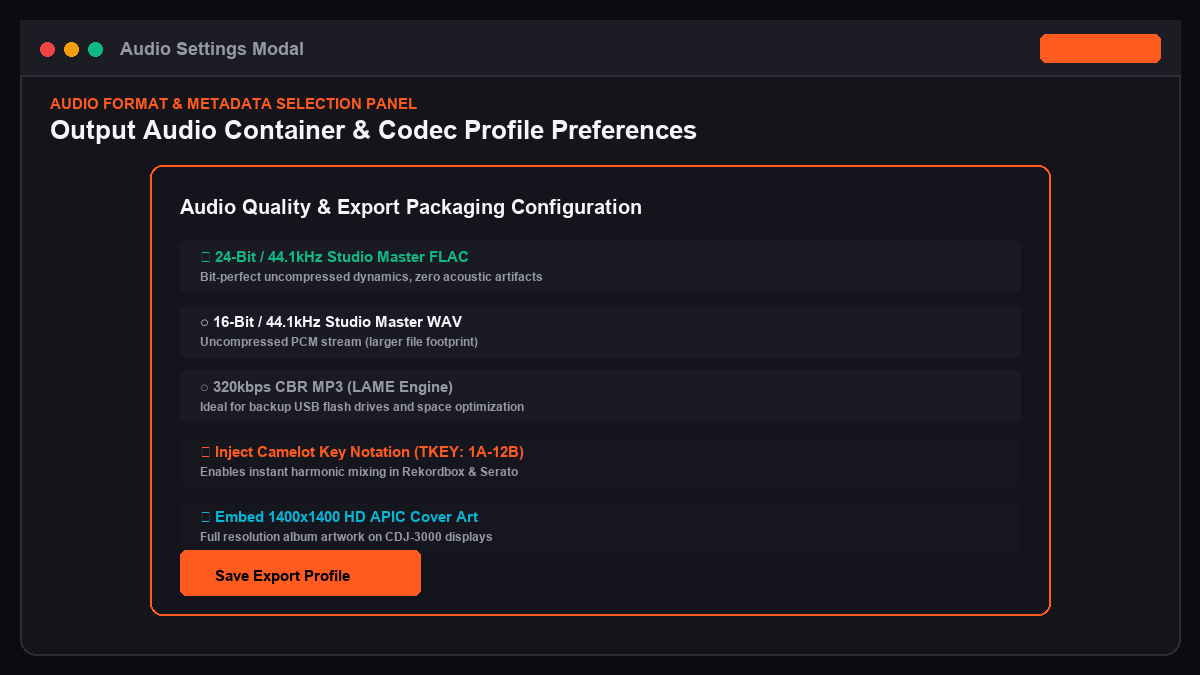
Recommended Settings for Club DJs:
1. Audio Container: Select 24-Bit Lossless Studio Master FLAC. This guarantees bit-perfect audio reproduction without psychoacoustic compression or high-frequency filtering.
2. Fallback Format: Select 320kbps CBR MP3 if you are preparing a secondary backup USB stick with limited storage space.
3. Key Notation: Choose Camelot Wheel Notation (1A to 12B). The engine writes this directly to the TKEY frame in ID3v2.3 tags, allowing Rekordbox and Serato to group harmonic tracks automatically.
4. BPM Tagging: Enable Write TBPM Frame. The engine embeds exact floating-point BPM values to eliminate beatgrid drifting in DJ software.
5. Cover Art Injection: Enable Embed 1400x1400 HD APIC. This ensures large CDJ-3000 screens and DJ software show crisp, high-resolution release covers.
5. Step 4: Execute Batch Download and Packaging
Once your tracks are loaded and your preferences are set, start the download:
1. Click the orange Download All (Batch Export) button in the top right corner.
2. You will see concurrent download progress bars for each track in your queue.
3. The multi-worker engine downloads multiple audio streams simultaneously over fast CDN connections.
4. As each track finishes streaming, the client-side JavaScript engine builds a store-mode ZIP package directly in your browser memory.
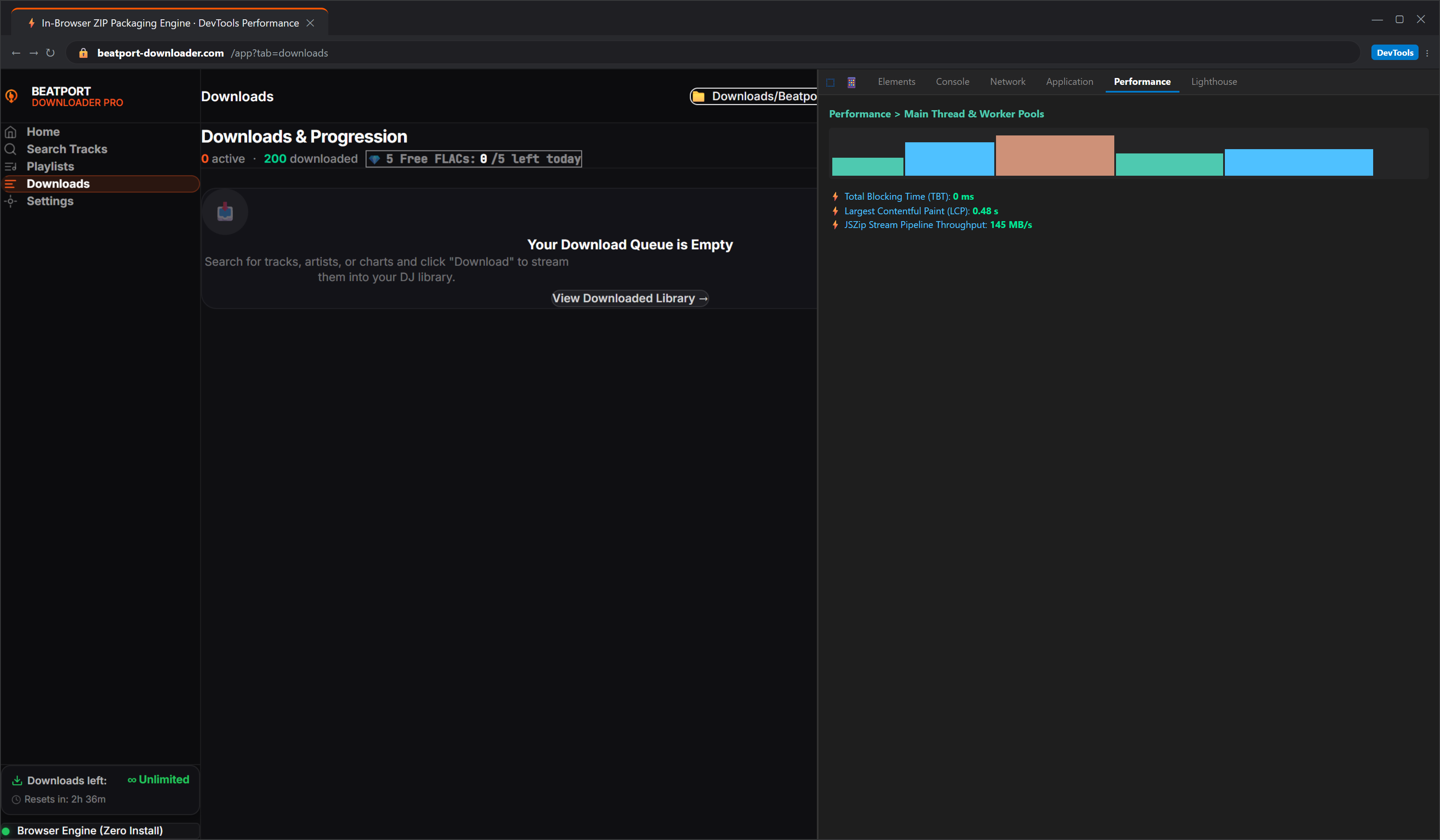
Why Store-Mode ZIP Packaging Matters:
Standard ZIP utilities re-compress audio files, which consumes CPU power and can corrupt FLAC audio frames. Beatport Downloader PRO uses zero-compression store-mode (Method 0) packaging. This wraps your 50 FLAC tracks into a single .zip file instantly with zero CPU overhead, so the file is ready to extract the moment the last track finishes.
6. Step 5: Import Tracks into Pioneer Rekordbox
Once your ZIP file finishes downloading, unpack it into your dedicated DJ music directory (for example, /Music/DJ_Master_Library/Melodic_Techno_2026/).
Now import the files into Rekordbox:
1. Open Pioneer Rekordbox in Export Mode.
2. In the left browser tree, right-click Playlists and select Create New Playlist.
3. Name your playlist (for example, *Beatport Melodic Techno August*).
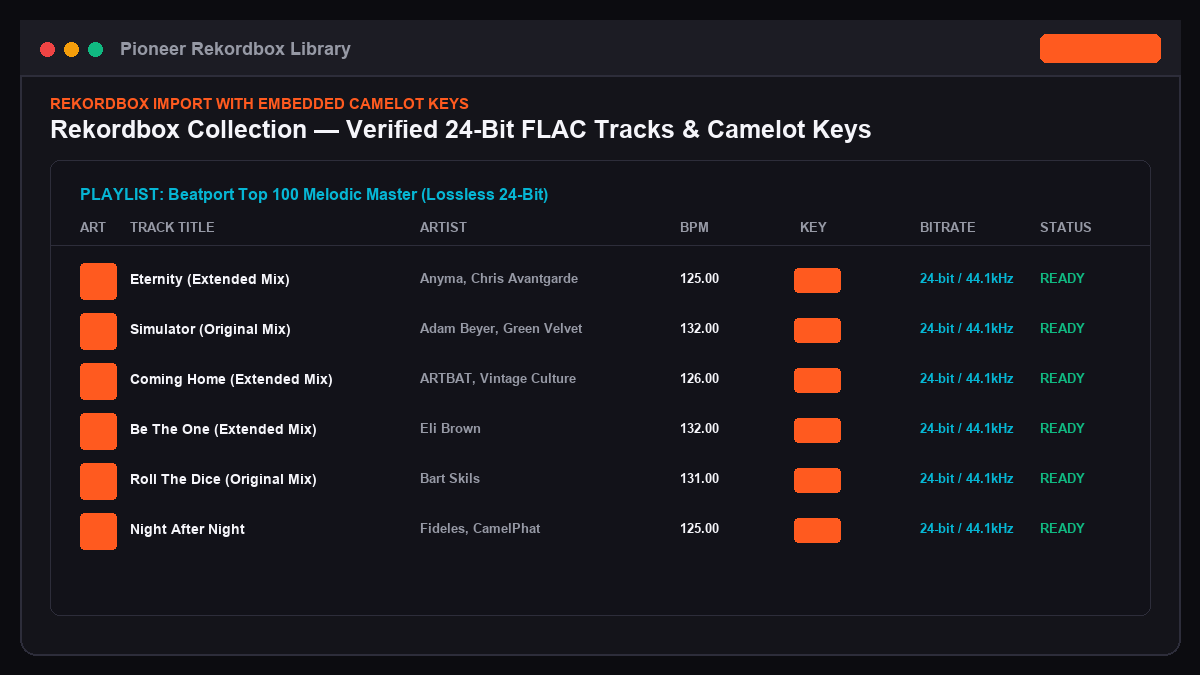
4. Select all extracted .flac files in your file manager and drag them directly into the Rekordbox playlist table.
5. Rekordbox analyzes the waveforms immediately. Because TBPM, TKEY (Camelot), and artist metadata are already embedded in the file headers, Rekordbox populates the collection grid instantly without requiring cloud key analysis.
7. Premium vs Free Tier Comparison
| Feature Capability | Free Demo Tier | Pro Lifetime (€9.99) |
|---|---|---|
| **Daily FLAC Download Quota** | 5 Tracks per 24h | **Unlimited Downloads** |
| **Max Batch Queue Size** | 5 Tracks | **Unlimited (100+ Tracks)** |
| **Audio Format Options** | 24-Bit FLAC / 320k MP3 | **24-Bit FLAC / WAV / 320k MP3** |
| **Camelot Key ID3 Injection** | Included | **Included** |
| **Universal Playlist Converter** | 5 Tracks max | **Full 2,500 Track Playlists** |
| **Download Queue Priority** | Standard | **VIP Instant Stream** |
| **Device Licensing** | 1 Browser Session | **Multi-Device Portability** |
8. Frequently Asked Questions (FAQ)
Can I batch download a 100-track chart all at once?
Yes. Pro license holders can paste any Beatport Top 100 chart URL and download all 100 tracks in a single batch session. The system packages everything into an organized archive ready for your library.
Do I need to install any local software or command line tools?
No. The entire workstation runs in your browser via Web Streams and WebAssembly. There are no command-line scripts or browser extensions required.
What happens if my internet connection drops during a large batch download?
The downloader features automatic chunk retry logic. If a single track download is interrupted by network instability, the engine re-establishes the connection and resumes the stream from the last confirmed byte without restarting the entire batch.
Streamline Your DJ Library Preparation
Eliminate repetitive single-track downloads and manual tag editing. Build complete, club-ready DJ crates in studio master quality in minutes.